Course Outline
Introduction
Week 1: Overview of Mobile Development
- Mobile Ecosystem and Platforms
- Overview of mobile operating systems (iOS and Android).
- Key differences between iOS, Android, and cross-platform development.
- Popular app stores (Apple App Store, Google Play Store).
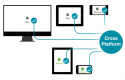
- Introduction to native, hybrid, and cross-platform development.
- Native vs Hybrid vs Cross-Platform
- Advantages and challenges of each development method.
- Overview of Swift (for iOS), Kotlin (for Android), and React Native (cross-platform).
- How code translates to mobile platforms (JavaScript to native code in React Native).
- Programming Fundamentals
- Introduction to programming concepts (variables, data types, functions, control flow).
- Comparison of Swift, Kotlin, and JavaScript syntax.
- Writing simple programs using Swift, Kotlin, and JavaScript.
- Setting up Development Environments
- Installing Xcode and Android Studio.
- Setting up React Native CLI and Expo.
- Running basic "Hello World" apps on simulators and emulators.
Week 2: Introduction to Swift, Kotlin, and JavaScript
- Swift Programming for iOS
- Variables, constants, and data types in Swift.
- Control flow statements (
if,switch, loops). - Functions and parameters in Swift.
- Introduction to Xcode's interface and Swift Playgrounds.
- Kotlin Programming for Android
- Variables, data types, and functions in Kotlin.
- Understanding Kotlin’s null safety.
- Control flow and loop structures.
- Introduction to Android Studio’s interface and Kotlin Playground.
- JavaScript for React Native
- Variables, constants, and control flow in JavaScript.
- ES6 features: arrow functions, template literals, and destructuring.
- Writing and running basic JavaScript programs in React Native using Expo.
Week 3: iOS User Interface Design
- UI Elements in iOS
- Introduction to UIKit and SwiftUI.
- Adding and customizing UI elements like buttons, labels, and text fields.
- Using Interface Builder to design UI.
- Working with Storyboards and designing multi-screen UIs.
- Auto Layout and Constraints
- Understanding the Auto Layout system.
- Using constraints for responsive layouts across different screen sizes.
- Creating stack views and dynamically adjusting UI elements.
- SwiftUI Basics
- Introduction to declarative UI design in SwiftUI.
- Building simple UI components using SwiftUI.
Week 4: Android User Interface Design
- XML Layouts in Android
- Introduction to XML-based layout design.
- Working with common layouts: LinearLayout, RelativeLayout, ConstraintLayout.
- Adding and customizing UI elements: buttons, text views, image views.
- Using ConstraintLayout for responsive and dynamic layouts.
- Material Design
- Integrating Material Design principles (colors, icons, typography).
- Using Material Components (buttons, floating action buttons, cards).
- Implementing themes and styling for Android apps.
Week 5: React Native User Interface Design
- React Native Flexbox Layout
- Understanding Flexbox for responsive layout design.
- Creating column and row-based layouts.
- Styling UI components with Flexbox properties (justifyContent, alignItems, etc.).
- React Native Components
- Working with core components like
Text,View,TextInput, andButton. - Creating interactive UI elements such as forms and buttons.
- Using the
ScrollViewcomponent for dynamic content.
- Working with core components like
Week 6: Data Handling in iOS and Android
- iOS Data Handling
- Using UserDefaults for simple data persistence.
- Introduction to Core Data for local storage of complex data.
- Fetching data from APIs using URLSession.
- Parsing JSON data and displaying it in the UI.
- Android Data Handling
- Using SharedPreferences for storing small amounts of data.
- Introduction to SQLite and Room Persistence Library for managing databases.
- Fetching data from APIs using Retrofit.
- Parsing JSON and handling API responses.
Week 7: React Native State Management and APIs
- State and Props in React Native
- Managing data flow within React Native components.
- Using
useStatehook for managing local component state. - Passing data between parent and child components via props.
- Fetching Data in React Native
- Using the Fetch API and Axios to make HTTP requests.
- Displaying fetched data in lists (using
FlatList,SectionList). - Persisting data locally using AsyncStorage in React Native.
Week 8: Navigation in iOS and Android
- iOS Navigation
- Introduction to navigation controllers and managing multiple screens.
- Using segues to transition between view controllers.
- Passing data between view controllers.
- Implementing TabBar and NavigationBar for structured navigation.
- Android Navigation
- Working with Activities and Intents for multi-screen apps.
- Passing data between Activities using Bundles.
- Creating a Navigation Drawer and BottomNavigationView.
- Implementing fragments for flexible UI navigation.
Week 9: Navigation in React Native
- React Navigation Basics
- Installing and setting up React Navigation.
- Using Stack Navigator for screen transitions.
- Implementing Tab Navigator and Drawer Navigator for complex navigation.
- Passing parameters between screens and managing navigation state.
Week 10: Advanced Features
- iOS Advanced Features:
- Core location and maps
- Accessing device location with Core Location.
- Displaying maps using MapKit.
- Handling geolocation and user location tracking.
- Camera and media
- Accessing device camera and photo library.
- Capturing and displaying images with UIImagePickerController.
- Storing and retrieving media files.
- Core location and maps
- Android Advanced Features
- Location and maps
- Using the Google Maps API to display maps and user location.
- Accessing GPS data and handling geolocation.
- Camera and media
- Using CameraX to capture photos and handle camera permissions.
- Displaying images and handling media storage.
- Location and maps
- React Native Advanced Features
- React Native maps
- Integrating maps using
react-native-maps. - Handling location-based services (geolocation, route mapping).
- Integrating maps using
- Camera and media access
- Using the React Native Camera library for capturing photos.
- Accessing device media storage and handling files.
- React Native maps
Week 11: Debugging and Testing
- iOS Debugging and Testing
- Using Xcode debugger
- Setting breakpoints and inspecting variables in Xcode.
- Using the console for real-time debugging.
- Common debugging issues and how to resolve them.
- Unit testing in iOS
- Writing and running unit tests using XCTest framework.
- Mocking objects and testing UI components.
- Using Xcode debugger
- Android Debugging and Testing
- Using Logcat in Android Studio
- Logging and analyzing errors using Logcat.
- Debugging Android apps with breakpoints.
- Unit testing in Android
- Writing unit tests using JUnit.
- Testing Android UI components with Espresso.
- Using Logcat in Android Studio
- React Native Debugging and Testing
- React Native debugging tools
- Using Chrome DevTools and React Native Debugger for real-time debugging.
- Console logs and inspecting network requests.
- Unit testing in React Native
- Writing unit tests using Jest and Enzyme.
- Testing React Native components and managing test cases.
- React Native debugging tools
Week 12: App Deployment and Capstone Project
- Deployment and Distribution
- iOS App Store submission
- Preparing your app for distribution (icons, certificates, provisioning profiles).
- Using App Store Connect to submit the app for review.
- Using TestFlight for beta testing.
- Android Play Store submission
- Preparing APK and signing the app for distribution.
- Using Google Play Console for app submission and tracking.
- Understanding Play Store policies and guidelines.
- iOS App Store submission
- Capstone Project Development
- Final project development
- Building a fully functional app of your choice.
- Incorporating advanced features like API calls, navigation, media, and location.
- Presenting and demoing the final app to peers and instructors.
- Final project development
Summary and Next Steps
Requirements
- Fundamental understanding of programming concepts.
- Basic proficiency in JavaScript.
Target Audience
- Mobile developers.
- Programmers.
Testimonials (3)
Everything is ok.
Adrian Rybka - SEOyon
Course - Flutter Development Bootcamp with Dart
Very usefull additional informations
Grzegorz - Comp S.A.
Course - BLoC Pattern
Developing the User Auth App and the kahoot activity (made myself sure that i'm absorbing the training lectures :) and its fun!)